Faster
One click from the menu bar — straight to your folder. Jump to folders fast from the bookmark bar.
Learn more →A stylish file manager for Mac
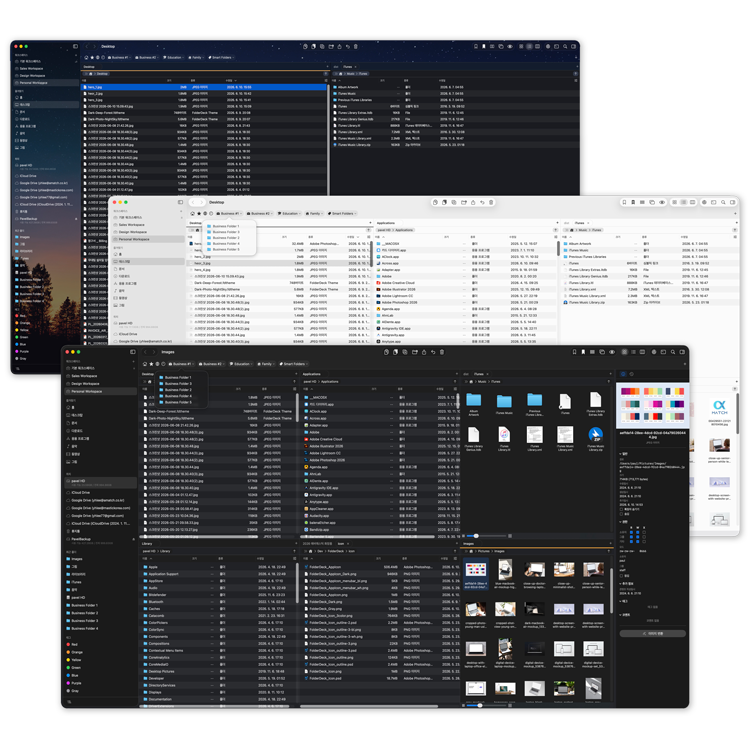
One click from the menu bar, the bookmark bar, or a workspace; six folders in one window; colors and background images styled your way. Meet FolderDeck — beyond the limits of Finder.
Version 1.1.3 (build 341) · macOS 14 Sonoma or later · Apple Silicon & Intel
One click from the menu bar — straight to your folder. Jump to folders fast from the bookmark bar.
Learn more →From dual panels to six. Your working folders on one screen.
Learn more →The whole app becomes your canvas — colors and images, your way.
Learn more →Every move, undoable — infinite session history.
Faster
Keep favorite folders and remote connections in the menu bar at all times — no Finder window needed; one click opens the folder. And like a browser, line up the folders you use most on the bookmark bar and jump to them anytime.
“No window, no problem.”
Faster with Workspace
Switch fast as your work changes. Save the folders you always open together as a workspace, and when the task shifts — design, development, cleanup — switch the whole set at once from the sidebar, the toolbar, or a keyboard shortcut.
“Switch tasks, and your whole space switches with you.”
Wider
11 panel layouts in a single window. Open up to six folders and drag to move or copy between any panels — no need to juggle six Finder windows.
“One window, six folders.”
Sleeker
Finder gave you gray, and only gray. FolderDeck lets you set the color of the sidebar, toolbar, path bar, menu bar, and file panels — each on its own — and drop an image behind the toolbar or sidebar.
“A look Finder can't give you.”
Every file action recorded per session. Undo single actions or whole batches.
Metadata and patterns matched in a single line.
PNG, WebP, JPG, rotate, resize, optimize — inside the folder.
xattr changes shown instantly, bypassing the Spotlight cache.
Save the search queries you use often.
Each panel has its own tabs. Sessions restore automatically.
Amazon S3 & Cloudflare R2 included. Multi-select, folder transfers, progress and cancel.
“Open in FolderDeck” right in the context menu.
Space to preview, plus a metadata panel on the right.
App appearance independent of the OS; first-class Korean and English UI.
Copy and move huge files and big batches without choking.
Jump back to folders you opened recently.
Start with everything free. Pro is the power-user expansion — a one-time purchase, not a subscription. Yours forever.
$0 · download
Cross Finder's limits with your first click — free.
$14.99 · Lifetime · Family Sharing for 6
Faster. Wider. Sleeker. — the whole product at once.
Install and get a 14-day free trial of every Pro feature — the Free tier keeps working after it ends.
Everything in Free, plus
Buy once, keep it forever — existing buyers pay nothing extra if the price rises. Share with up to 6 family members.
Menu bar. Six panels. One canvas. Get it on the App Store today.
Free to start · 14-day trial of every Pro feature
Version 1.1.3 (build 341) · macOS · Mac App Store
App Sandbox compliant · accesses only the folders you choose. File paths and names are never sent anywhere.